Wednesday, May 8, 2013

Informational text is the new nonfiction


The educational spotlight is shining on nonfiction. The CCSS for reading INFORMATIONAL TEXTS (RI) tell us that we must integrate more nonfiction than ever into the curriculum. The library will seize this opportunity to purchase and promote outstanding nonfiction.  Scroll down for some ideas  for incorporating some of our outstanding nonfiction books into the CCSS ELA lessons for next year from School  Library Journal Kathleen Odean. K-8


CC Standard RI.4.9 Integrate information from two texts on the same topic in order to write or speak about the subject knowledgeably.

Use these books...

Barretta, Gene.Now & Ben: The Modern Inventions of Benjamin Franklin.. Gr 2–5
Byrd, RobertElectric Ben: The Amazing Life and Times of Benjamin Franklin. iGr 4–7
Fritz, JeanWhat’s the Big Idea, Ben Franklin? Gr 3–5
Schroeder, AlanBen Franklin: His Wit and Wisdom from A to Z. Gr 2–5

Ben Franklin wore so many hats that he merits many biographies. These illustrated books at different reading levels take a variety of approaches to his life and work. Barretta uses a “Now/Then” structure, focusing on Franklin’s inventions in his day and how they’re used now. Schroeder uses an alphabetical arrangement that mixes miscellaneous facts; the letter “B,” for example, covers Boston, bifocals, andballoon. The Fritz and Byrd biographies are chronological structures, but have different tones and levels of detail. Students can compare emphases and structures, perhaps using a graphic organizer, and also compare the varied illustration styles and what they add to each text.


Gibbons, GailMonarch Butterfly.  PreS–Gr 2
Marsh, Laura F
.
 Caterpillar to Butterfly. PreS–Gr 2
CC Standard RI K.9 
With prompting and support, identify basic similarities in and differences between two texts on the same topic (e.g., in illustrations, descriptions, or procedures).
The amazing transformation from caterpillar to butterfly is conveyed in different ways by these two colorful books. Kindergarteners will be able to identify similarities in the information and differences in presentation such as photographs versus paintings. Both books use labels in the visuals to highlight body parts. The Marsh book has a table of contents, numbered chapters, a glossary, and tips for a butterfly garden. Gibbons’s book features a map of migration routes and explains how to raise a monarch butterfly.
Kudlinski, Kathleen VBoy, Were We Wrong About Dinosaurs! Gr 2–4
CC Standard RI.4.8 
Explain how an author uses reasons and evidence to support particular points in a text.
It was once believed that dinosaurs dragged their tails; now fossil finds indicate that they held their tails out straight. This upbeat book with humorous illustrations provides a valuable lesson in how science uses new findings and ideas to reevaluate accepted beliefs, comparing what scientists used to think about dinosaurs with what they think now. Students can make a chart listing each past belief, each new belief, and the evidence that prompted the change, and judge whether the evidence seems sufficient. The book explains that scientists still don’t have all the answers, often due to insufficient evidence, and they don’t always agree with one another in interpreting evidence. Students can look for language that indicates uncertainty, such as “there is no way to be sure.” Some students might like to compare this book to Kudlinski’s Boy, Were We Wrong about the Solar System! (Dutton, 2008) which has a similar structure.
Leedy, LoreenSeeing Symmetry.  Gr 2–4
CC Standard RI.3.7 
Use information gained from illustrations (e.g., maps, photographs) and the words in a text to demonstrate understanding of the text (e.g., where, when, why, and how key events occur).
Bright computer-generated pictures use familiar objects like food, animals, and people to show examples of vertical, horizontal, and rotational symmetry. The simple text explains the concepts and introduces new vocabulary like line symmetrymirror image,horizontalvertical, and rotate, terms which will require going over more than once. Students can then seek out examples in school and at home to demonstrate their understanding of the types of symmetry. Teachers may also want to use the two craft activities given at the back of the book to reinforce the concepts.
Macaulay, David, and Sheila KeenanCastle: How It Works.Gr 1–3
CC Standard RI.2.4 
Determine the meaning of words and phrases in a text relevant to a grade 2 topic or subject area.
The master of architectural books turns his talents to a younger crowd with this easy reader that meets the CC need for texts on technical subjects. With a slight fictional story line, the appealing text and pictures introduce castle residents, parts of the building, and different weapons, using technical terms in context like siege and portcullis, which are also defined in the glossary. At certain points the voice is second person, such as, “You are deep within the castle.” Students can note where that’s used and what it adds. Another book in the series by the same authors is Jet Plane: How It Works, which has similar features and approach.
Mann, ElizabethEmpire State Building. Gr 4–8
CC 
Standard RI.5.3 
Explain the relationships or interactions between two or more individuals, events, ideas, or concepts in a historical, scientific, or technical text based on specific information in it.
The Empire State Building dazzled New York City when it was built in 1931. This engaging Orbis Pictus Honor Book employs cutaways and numbered diagrams to demonstrate how it was constructed. Students can analyze how the text and visuals, including paintings and historical photographs, convey the process, noting that building skyscrapers depended on technological advances such as the inventions of steel and the automatic elevator brake. Another central idea is that during the Great Depression the Empire State Building was an important symbol of hope to New Yorkers, who were proud of the height made possible only by those technological advances. Check out other books in the “Wonders of the World” series, too, which satisfy the CC call for technical content.
Rappaport, DoreenMartin’s Big Words: The Life of Dr. Martin Luther King, Jr.  K–Gr 3
CC Standard RI.1.2 
Identify the main topic and retell key details of a text.
The lyrical words and expansive pictures in this stunning award winner make it an excellent read-aloud. After listening to the book more than once or reading it independently, students can discuss its title and subtitle, which point to the main topic about the power of words in Dr. King’s life. As a class or in small groups, they can find details in the text, including the quotes in a colored typeface, that relate to the theme. Enrich the experience by listening to a clip from one of Dr. King’s speeches at Stanford’s MLK website.
Burgan, MichaelBreaker Boys: How a Photograph Helped End Child Labor. Gr 6–9
CC Standard RI.6.5 
Analyze how a particular sentence, paragraph, chapter, or section fits into the overall structure of a text and contributes to the development of the ideas.
Photographs can change history. So contends this and other entries in the valuable “Captured History” series. Breaker Boys’ straightforward text focuses on a 1911 photograph by Lewis Hine of a group of boys who sorted coal at a Pennsylvania mine for 10 hours a day. The four chapters discuss coal mining, children in the mines, Hine and his work, and the slow changes in child labor laws. Students will be able to identify the structure as cause and effect, and analyze the role of the four chapters. They can also look for sentences and paragraphs that develop the idea of the political influence of photographs. To extend the topic, have students find more Hine photographs about child labor at the Library of Congress website or Flickr.com that can be used in presentations.
Burns, Loree GriffinTracking Trash: Flotsam, Jetsam, and the Science of Ocean Motion.  Gr 6–9
CC Standard RI.7.3 
Analyze the interactions between individuals, events, and ideas in a text (e.g., how ideas influence individuals or events, or how individuals influence ideas or events).
This fascinating photo-essay presents the work of an oceanographer who studies ocean currents by following the movement of debris like rubber ducks and hockey gloves spilled by container ships into the Pacific. Students can identify the central ideas about principles of ocean movement and issues around pollution, and trace their interaction through the text, noting how information about the scientist’s work and scientific methods are integrated with those ideas. Students can also consider how photographs, diagrams, and maps are crucial in developing the concepts. Other entries in the excellent “Scientists in the Field” series also lend themselves to use with Common Core.
Schlosser, Eric and Charles Wilson. Chew on This: Everything You Don’t Want to Know About Fast Food.Gr 7–10
CC Standard RI.8.8 Delineate and evaluate the argument and specific claims in a text, assessing whether the reasoning is sound and the evidence is relevant and sufficient; recognize when irrelevant evidence is introduced.
Fast food—good or bad? In adapting Schlosser’s best seller Fast Food Nation, the authors thoughtfully added material relevant to teens about how fast food is marketed to young people and about teenagers who work in fast food restaurants. They point to problems with working conditions at the restaurants and with inhumane treatment of animals at companies that supply meat. They also argue that fast food harms the environment and consumers’ health. Students can consider whether the authors provide credible evidence for their arguments and if they acknowledge competing arguments about benefits of fast food such as convenience and low prices.
Stone, Tanya LeeAlmost Astronauts: 13 Women Who Dared to Dream.Gr 6 Up
CC Standard RI.8.6 Determine an author’s point of view or purpose in a text and analyze how the author acknowledges and responds to conflicting evidence or viewpoints.
In the early 1960s, 13 women highly qualified to become astronauts were excluded by NASA from the Mercury space program. This appealing Sibert Award winner, notable for the author’s strong point of view, explores the reasons and biases behind the decision. Students can examine the text for language and other evidence that show Stone’s position on the topic and the people involved. For example, what words does she use to describe the women, some of whom she interviewed? How does she present opposing viewpoints that argued that women shouldn’t be included? One of the book’s main themes is that society minimized women’s abilities and restricted their opportunities. Students can consider how photographs and artifacts like advertisements are used to make that case, and if it’s presented fairly.

-Kathleen Odean


Friday, April 12, 2013

21 Reasons to Stop Saying "21st Century Teacher"

Just saying... Why are we still talking about it... just get on with it all ready.

Very funny post from Richard Byrne 


21 Reasons to Stop Saying "21st Century Teacher"

This afternoon I saw a blog post titled 27 Ways To Be A 21st Century Teacher. 22 of the 27 items in that list could have been 50 years ago. And 24 of the 27 items are things that I did as a sixth grade student in 1990 (yes, I coded thanks to Logo Writer). Because of this I Tweeted the following in response to seeing the list;

A couple of people asked me about this Tweet so please allow me to elaborate on why I'm tired of people saying "21st Century Teacher" as if it means something.

1. We live in the 21st Century. If you're teaching today, you're a 21st Century teacher.
2. We live in the 21st Century. Even if you're using older methods (some of which have a lot of validity) you're still a 21st Century teacher unless you're going 88.8 miles per hour in a DeLorean to get to work every morning.
3. Unless you plan on teaching for another 87 years, you're not going to be a 22nd Century teacher so don't try to be all curve-jumping. Again, exceptions made for people commuting in a DeLorean at 88.8mph.....READ MOR
E

Thursday, April 4, 2013

Tools for Teaching: Ditching The Deficit Model

Tools for Teaching: Ditching The Deficit Model


...

Building on Strengths and Interests

As teachers, we must evaluate where students are academically, and this includes their literacy and behavioral development as well as content knowledge. And the best way to serve and support those identified areas of need is to use research-based best practices to help students grow and catch up when they are missing information and/or skills.
But what if from there, we used their talents, their abundance of abilities and skills -- those jewels -- to meet those needs?

Tuesday, April 2, 2013

Teachers' Guide to Videos

WOW - Jensa shared this great resource from one of our FAVORITE places - MindShift
In collaboration with educator Catlin Tucker,MindShift presents Teachers’ Guide to Videos[PDF], to answer these questions and more. You’ll find a slew of valuable resources, including video links for all kinds of subjects — history, math, science, language arts, and more — and ideas on how to inspire students to use videos as a conduit to dig in, ask questions, and learn.


Friday, March 22, 2013

Wonderstruck- Virtual Field Trip and More


Wonderstruck-Virtual Field Trip and More

The worlds of Brian Selznick's Wonderstruck and The Invention of Hugo Cabret - Teaching guide
Virtual trip to the setting of Wonderstruck, activities and more.


Passwords--Are Yours Doing the Job?

I just ran across this article yesterday when I was looking for something else. Considering that our students often have several passwords to manage, I think we tend to help them create easy, memorable passwords. But maybe we need to start challenging them a bit as they get older. Coming up with good passwords isn't easy, but this article by Nicole Perlroth in the New York Times may give you some ideas.

Tuesday, March 12, 2013

The World IsYour Class

We need to think about this.....Massive Open Online Courses are being compared to the early days of television or movies. We need to think about how they could affect us and our students. More importantly, we need to start thinking about the fact that learning shouldn't be considered just a K-12+higher ed event, but a lifelong journey. Here's a  brief post about MOOCs.

Friday, March 8, 2013

Technology-Rich Learning


The March issue of Educational Leadership (ASCD) is all about Technology-Rich Learning. I actually read it cover to cover. Great articles by Marzono, Tomlinson, and Tom Hoerr (Ellen's former principal)
Click the image above to see the infographic and find the current issue - 

Students First, Not Stuff

Will Richardson
Technologies reframe learning, but educators reimagine schooling.

New Literacies and the Common Core

William Kist
Strategies for learning the fundamentals of reading, writing, and comprehending in the information age.

Flip Your Students' Learning

Aaron Sams and Jonathan Bergmann
Flipped learning is not about how to use video but about how to use students' time.
From "Perspectives"
This issue of Educational Leadership marks the eighth issue that EL has dedicated to technology. (The first with the word "technology" in the title was published in 1968.) As the editors read through submissions, we found the articles fell into several categories: essays from futurists who believe schools are neglecting the revolutionary potential of technology on learning (pp. 10, 22); articles from groundbreaking educators who are experimenting with new student-centered approaches like flipped learning and video screencasts (pp. 16, 28, 84); reports on research and the lack thereof when it comes to knowing what works best for students (pp. 32, 44, 78); and, finally, many articles from educators who are trying to weave tradition and technology into what Catlin R. Tucker (p. 57) calls "a durable education fabric."


Tuesday, December 11, 2012

Let Your BrainPOP Over Animation & Learning


BrainPop is an incredibly rich, engaging resource that everyone at SCS can use to learn...A LOT!  BrainPOP creates animated, curriculum-based content that supports educators and engages students.  There are movies, quizzed, experiments, timelines, activity pages, graphic organizers, vocabulary builders and MORE!
Hundreds of topics within science, social studies, english, technology, arts & music, and health.

Thank the PTO for funding our BrainPOP & BrainPOP Junior subscription this year - with FULL HOME ACCESS!

You can even search by state standards. Use it on an iPad! & Iphone & android devices

in School USE GOOGLE CHROME

login; shelburne1
pw; cats

Tuesday, October 16, 2012

Why can't schools be more like summer camp-Really!

Let's make things!!!

3 Things That Schools Can Learn from Summer Camp from Amplify
http://amplify.com/article/why-isnt-school-more-summer-camp


"I'm fascinated by what I see when kids get the opportunity to make things. They enjoy what they are doing, and they begin to direct their own work toward their own creative goals. For those who are disengaged, we have to help them discover a state of play."

Thursday, October 11, 2012

Election 2012 on Discover Education

Great place for short videos

Discovery Education has partnered with MacNeil/Lehrer Productions—producers of the PBS NewsHour—to offer exclusive presidential election coverage. Check here weekly for three-minute video news summaries designed to keep students up-to-date on the latest developments of the election. In addition, each week a new further learning activity will be added to this page. See "About Election 2012" under More Resources for further details.

Monday, October 8, 2012

5 Critical Mistakes Schools Make With iPads (And How To Correct Them)


5 Critical Mistakes Schools Make With iPads (And How To Correct Them)


Over the last few years K-12 schools and districts across the country have been investing heavily in iPads for classroom use. EdTechTeacher has been leading iPad professional development at many of these schools and we’ve seen firsthand how they approach iPad integration.
While we’ve witnessed many effective approaches to incorporating iPads successfully in the classroom, we’re struck by the common mistakes many schools are making with iPads, mistakes that are in some cases crippling the success of these initiatives. We’re sharing these common challenges with you, so your school doesn’t have to make them.

Sunday, October 7, 2012

Earth Science Animations

A bunch of great EARTH SCIENCE animations on the Curriki website


Neil Gaiman's 8 Rules of Writing

Neil Gaiman’s 8 Rules of Writing by Maria Popova “Perfection is like chasing the horizon. Keep moving.” In the winter of 2010, inspired by Elmore Leonard’s 10 rules of writing published in The New York Times nearly a decade earlier, The Guardian reached out to some of today’s most celebrated authors and asked them to each offer his or her commandments. After Zadie Smith’s 10 rules of writing, here come 8 from the one and only Neil Gaiman (Graveyard Book, Coraline...)

Also check out: For more timeless wisdom on writing, see Kurt Vonnegut’8 rules for a great storyDavid Ogilvy’10 no-bullshit tipsHenry Miller’11 commandments,Jack Kerouac’30 beliefs and techniquesJohn Steinbeck’6 pointers, andSusan Sontag’synthesized learnings.

Friday, July 20, 2012

Pinterestingly....

I know, what a terrible pun. I've been using Pinterest a bit recently--not actually  adding information to any boards of my own, but looking at what others have been doing. Pinterest is being touted as one of the hottest takeoffs on the Internet. It's straightforward and easy to use. Sign up, create a board with the title of one of your interests, and "pin" websites and pictures to the board. The resulting display is very visual and accessible.  Click on an image and you're taken to the site. There's a place for labels and who pinned it previously (did I say you could repin?).  Teachers have been using it to create quick-click resource websites for students.  You can't share boards and students can't use it under the Pinterest terms of service, but it is a really useful tool. Today, after reading an article by Kate Messner in School Library Journal about Pinterest and its uses by authors I checked out her Pinterest board for the book Marty McGuire Digs Worms--a book we have in our library. Kate lists a review, information about the book, a Twitter  book club link, and lots of information about worms, composting, Earth Day, and activities.

You can search for Pinterest boards when you are searching for information about a topic or to find classroom resources on a topic. Searching for the search terms Pinterest and 2nd grade listed about a dozen teacher sites with 2nd grade as a theme. Search for early literacy, math games, French revolution, whatever.

When you find resources you want to share--maybe with students or parents--create your own boards with your curated resources. You don't need any tech expertise to use Pinterest, just some things you'd like to find and share.

Get Your PLN Info HERE

We had some questions last year about PLNs. PLN is a term that's been floating around the edtech/library world (and probably others we are unaware of) for a couple of years. PLN stands for Personal Learning Network. Most of us--you, too--already have one of some sort. It may be one of the teachers you work with, maybe your mentor, or an administrator. You may also have certain journals you read or columns you check. Those people, either physically present or not, constitute your personal learning network. They're your go-to folks. Chances are, your PLN could be more robust and informative to you if you did a little tweaking. Social media and web 2.0 tools make this easy. A school librarian, Jennifer LaGarde, has created an online tool absolutely chock full of how-to's for growing your PLN. Don't sigh and say, "I'll do this later." Start by taking a peek and some baby steps--you'll be amply rewarded.

Monday, July 9, 2012

Choosing Apps-a Guide

Silvia Tolisano has been posting about choosing apps for education for quite some time on her blog, Langwitches. She points out that we are all in new territory here and that teachers need to consider their students, the learning goals, and the capability of a particular app in order for it to be used effectively with students. To aid the conversation with teachers she has developed a graphic that explains various considerations and questions. View the graphic, which can also downloaded in PDF format from the website,

Thursday, July 5, 2012

Flat Stanley App

Several teachers and students at SCS have participated in the Flat Stanley project in the past. Now there's an app for that. Activity generally it consists of sending a flat, paper Stanley through snail mail with the goal of getting his picture and story with others around the world.  Flat Stanley helps students learn about travel, while discovering different cultures to develop a love for reading.  With this new app, students can learn about the world through the eyes of Stanley in a way never before possible. Students can create their own Flat Stanley (or Flat Stella), they can change Stanely’s features and clothes and even give him a name and bio before sending him out into the world.  Students can share photos through email, Twitter and Flatter World within the app.   In Flatter World, new Flat Stanleys have been spotted. If students take enough pictures, they can unlock the new Flat Stanleys to take photos with.
The Flat Stanley app is COPPA compliant, which means that it is happily usable for kids under the age of 13.  An approval crew monitors and approves images shared through the app for an extra layer of safety for students.

Tuesday, June 26, 2012

Follow Digital Kindergarten

Digital Kindergarten This is a great blog to follow, particularly if you teach the lower grades. Here is the introduction: Using technology in meaningful, developmentally appropriate ways to make learning come alive and differentiate instruction so that all students achieve. I hope this blog is helpful to anyone utilizing technology with children. If you have found it useful, I appreciate you letting me know and sharing with others. The author has recently been posting about using iPads in the kindergarten classroom. She has some good suggestions.

Friday, May 25, 2012

:The Multiage Magic

This is pretty thought provoking - good stuff no matter what the current cicumstances. If you can spare a few minutes.. Listen to the poem.. Digest the post. Click the link below. "And since the whole thing's imagined anyhow, Imagine being Kevin. Which is he?" Part of the magic of imagination in the education of ourselves as young people lies in our seeing - and in our constantly changing understanding - of the older people around us. We see, we assume, we imagine, we project, we play at, we practice... and then we cycle through all of that again and again." FOLLOW THIS LINK:
SpeEdChange: The Multiage Magic

Monday, May 21, 2012

TED-Ed Lessons Worth Sharing


Use engaging videos to create customized lessons. You can use, tweak, or completely redo any lesson featured on TED-Ed, or create lessons from scratch based on any video from YouTube. 


Google Knowledge Graph: Things Not Strings


"The Knowledge Graph enables you to search for things, people or places that Google knows about—landmarks, celebrities, cities, sports teams, buildings, geographical features, movies, celestial objects, works of art and more—and instantly get information that’s relevant to your query. This is a critical first step towards building the next generation of search, which taps into the collective intelligence of the web and understands the world a bit more like people do."

"When you search for things, people, or places that Google knows about, we can use the Knowledge Graph to enhance your search results.
Find the right thing
The words you search with can often have more than one meaning. With the Knowledge Graph we can understand the difference, and help you narrow your results to find just the answers you're looking for.
Get the best summary
See key facts about your search with the most useful and interesting information for that particular topic, based on the questions other people have asked.
Go deeper and broader
Make unexpected discoveries and explore a topic more deeply with a springboard of information at your fingertips. What you find may surprise you!"


Thursday, May 17, 2012

Favorite Apps


Just a few of our favorite apps for the iPad


Pages lets you create beautiful letters, reports, flyers, and more on your iPad, iPhone, and iPod touch. No matter which device you’re on, iCloud keeps your Pages documents up to date across them all — automatically. And the Retina display makes everything you do in Pages look even more brilliant. 


Flipboard creates a personalized magazine out of everything being shared with you. Flip through your Facebook newsfeed, tweets from your Twitter timeline, photos from Instagram friends, sounds from SoundCloud and much more.


Dropbox is a free service that lets you bring all your photos, docs, and videos anywhere. After you install Dropbox on your computer, any file you save to your Dropbox will automatically save to all your computers, your iPhone and iPad and even the Dropbox website! With the Dropbox app, you can take everything that matters to you on the go.


Evernote is an easy-to-use, free app that helps you remember everything across all of the devices you use. Stay organized, save your ideas and improve productivity. Evernote lets you take notes, capture photos, create to-do lists, record voice reminders--and makes these notes completely searchable, whether you are at home, at work, or on the go. 


** The original, easiest-to-use, best-selling handwriting app for iPad. On sale. **
Penultimate gives you the fast, tactile gratification of writing on paper, with digital power and flexibility. Take notes, keep sketches, or share your next breakthrough idea -- in the office, on the go, or home on the sofa.

Star Walk is an award-winning Education app that allows users to easily locate and identify 20,000+ objects in the night sky. The 360-degree, touch control star map displays constellations, stars, planets, satellites, and galaxies currently overhead from anywhere on Earth.
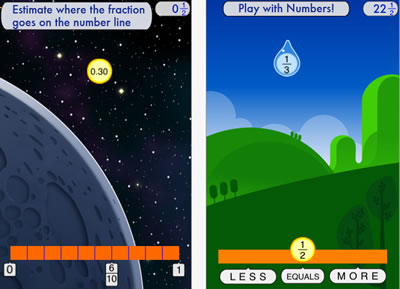
Developed at the Stanford School of Education, Motion Math HD follows a star that has fallen from space, and must bound back up, up, up to its home in the stars. Moving fractions to their correct place on the number line is the only way to return. A recent controlled experiment showed that by playing Motion Math HD, learners improve their ability to estimate fractions and their attitudes toward math.
"History:Maps of World" is a fun and educational collection of high-resolution historical maps.
Check it out to keep up with your history, learn something about history.

 Really fun art/science app exploring colors


Explore art on your iPad.

Art repository Art.com presents a new iPad app, ArtCircles, which lets you explore curated collections of the world's greatest artworks. Curators include designer, Yves Behar; technology innovator, Michael Hawley; president of Rhode Island School of Design, John Maeda, among others.


Wednesday, May 16, 2012

Monday, May 14, 2012

The Map of Life


The current release allows you to explore globally the geographic distributions for any terrestrial vertebrate species (as well as North American freshwater fish). Specifically you are able to:
  1. Display expert range maps, point occurrence records, records from study areas such as reserves and larger regions. These are shown as layers on maps, and a layer control widget allows you to adjust ordering, visibility, etc .  
  2. Retrieve a list of species for the vicinity of any location worldwide using the species list tool. Simply set search radius and group of interest, and right click (control-click on Macs) your mouse button on a point of the map.


Map of Life will allow users to see several levels of detail for a given species–from the broad type of environment it lives in, to the finest–specific locations where the species’ presence has been documented.  Users may now click on a point on the map and generate a list of vertebrate species in the surrounding area.  The project gleans data from a  variety of sources, including field guides, museum collections and wildlife checklists that involved scientists, conservation organizations and “citizen scientists. The current demo release allows users explore globally distributions for any  vertebrate species and for North American freshwater fish. Much more to come!
A press release from a research team from the University of Colorado and Yale University quoted CU-Boulder Associate Professor Robert Guralnick of the Ecology and Evolutionary Biology Department, and research team member:.
We are taking 200 years of different types of knowledge coming from different sources, all documenting the locations of species around the world and compiling them in a way that will greatly enhance our knowledge of biodiversity.  Such information could be used by any organization that needs to make informed decisions regarding land management, health, conservation and climate change.
Walter Jetz, Associate Professor of Ecology and Evolutionary Biology at Yale, and the project lead, shared:
It is the where and the when of a species. It puts at your fingertips the geographic diversity of life. Ultimately, the hope is for this literally to include hundreds of thousands of animal and plant species and show how much or indeed how little we know of their whereabouts.
The project will rely on citizen participation, and an upcoming mapping tool will offer the opportunity for amateurs to supply new or missing information regarding the distribution and abundance of a species.  According to Guralnick,
A small but powerful next step is to provide a means for anyone, anywhere on the globe to use their mobile devices to instantly pull up animal and plant distributions and even get a realistic assessment on the odds of encountering a particular species of wildlife.

Thanks to Joyce Valenza for sharing this great resource.

Highly recommended Apps by 2nd Graders

This is a link to a great post by Mr. Schu.  He surveyed his 2nd grade class and shares their top pics:


http://www.alsc.ala.org/blog/2012/05/mr-schus-2nd-graders-highly-recommend-these-apps/