WOW! New York Times Virtual Reality- Shared "The Displaced" with Monique's 5th grade "Global Read Aloud" students. They are reading the book Fish- about refugees Awesome- get the app! http://goo.gl/SJgTKz
Showing posts with label Apps. Show all posts
Thursday, November 12, 2015
Virtual Reality and The Global Read Aloud
Labels:
Apps,
global read aloud,
GRA,
nytimes,
virtual,
virtual reality
Friday, March 6, 2015
inklewriter - create interactive stories
inkle is looking to bring interactive stories to the classroom, and give teachers free and simple get-stuck-right-in software to use with their students. From within a web-browser, the inklewriter will let students make and play interactive stories with no programming required.
Labels:
Apps,
interactive,
language arts,
stories,
writing
Wednesday, May 21, 2014
Friday, March 21, 2014
The MAGIC of AUGMENTED REALITY-- Create Your Own!
The magic of augmented reality… Create your own!
Some of you have seen the awesome example of AR- “augmented reality” we shared in the library (The Fantastic Flying Books… ) you focus your iPad on a page in the book and it comes alive - the “reality” (page in book) is “augmented” with technology. AR blends real life with virtual reality.
There is a wow factor - but what about the “so what?” Now we - teachers, students can create our own augmented reality experiences! Easy as 1-2-3! I see sooooo many amazing possibilities for learning. It’s hard to imagine it if you have not experienced it. Stop by the library for a tour!
See the IMAG·N·O·TRON in action! from Moonbot Studios on Vimeo.
Some of you have seen the awesome example of AR- “augmented reality” we shared in the library (The Fantastic Flying Books… ) you focus your iPad on a page in the book and it comes alive - the “reality” (page in book) is “augmented” with technology. AR blends real life with virtual reality.
There is a wow factor - but what about the “so what?” Now we - teachers, students can create our own augmented reality experiences! Easy as 1-2-3! I see sooooo many amazing possibilities for learning. It’s hard to imagine it if you have not experienced it. Stop by the library for a tour!
See the IMAG·N·O·TRON in action! from Moonbot Studios on Vimeo.
Monday, September 16, 2013
SpellingCity for iPhone, iPad, and iPod touch on the iTunes App Store
VocabularySpellingCity is a fun way to learn spelling and vocabulary words by playing engaging learning games using any word list. The most popular activities are Spelling TestMe, HangMouse, and our vocabulary games, available to Premium Members. The most popular word lists are Sound Alikes, Compound Words, Hunger Games and SAT Words. This is a free app!
SpellingCity for iPhone, iPad, and iPod touch on the iTunes App Store
Monday, October 8, 2012
5 Critical Mistakes Schools Make With iPads (And How To Correct Them)
Over the last few years K-12 schools and districts across the country have been investing heavily in iPads for classroom use. EdTechTeacher has been leading iPad professional development at many of these schools and we’ve seen firsthand how they approach iPad integration.
While we’ve witnessed many effective approaches to incorporating iPads successfully in the classroom, we’re struck by the common mistakes many schools are making with iPads, mistakes that are in some cases crippling the success of these initiatives. We’re sharing these common challenges with you, so your school doesn’t have to make them.
Thursday, July 5, 2012
Flat Stanley App
Several teachers and students at SCS have participated in the Flat Stanley project in the past. Now there's an app for that. Activity generally it consists of sending a flat,
paper Stanley through snail mail with the goal of getting his picture
and story with others around the world. Flat Stanley helps students learn about travel, while
discovering different cultures to develop a love for reading. With this
new app, students can learn about the world through the eyes of Stanley
in a way never before possible. Students can create their
own Flat Stanley (or Flat Stella), they can change Stanely’s features
and clothes and even give him a name and bio before sending him out into
the world. Students can share photos through email, Twitter
and Flatter World within the app. In Flatter World, new Flat Stanleys
have been spotted. If students take enough pictures, they can unlock the
new Flat Stanleys to take photos with.
The Flat Stanley app is COPPA compliant, which means that it is happily usable for kids under the age of 13. An approval crew monitors and approves images shared through the app for an extra layer of safety for students.
Thursday, May 17, 2012
Favorite Apps
Just a few of our favorite apps for the iPad
Pages lets you create beautiful letters, reports, flyers, and more on your iPad, iPhone, and iPod touch. No matter which device you’re on, iCloud keeps your Pages documents up to date across them all — automatically. And the Retina display makes everything you do in Pages look even more brilliant.
Flipboard creates a personalized magazine out of everything being shared with you. Flip through your Facebook newsfeed, tweets from your Twitter timeline, photos from Instagram friends, sounds from SoundCloud and much more.
Dropbox is a free service that lets you bring all your photos, docs, and videos anywhere. After you install Dropbox on your computer, any file you save to your Dropbox will automatically save to all your computers, your iPhone and iPad and even the Dropbox website! With the Dropbox app, you can take everything that matters to you on the go.
Evernote is an easy-to-use, free app that helps you remember everything across all of the devices you use. Stay organized, save your ideas and improve productivity. Evernote lets you take notes, capture photos, create to-do lists, record voice reminders--and makes these notes completely searchable, whether you are at home, at work, or on the go.
** The original, easiest-to-use, best-selling handwriting app for iPad. On sale. **
Penultimate gives you the fast, tactile gratification of writing on paper, with digital power and flexibility. Take notes, keep sketches, or share your next breakthrough idea -- in the office, on the go, or home on the sofa.
Star Walk is an award-winning Education app that allows users to easily locate and identify 20,000+ objects in the night sky. The 360-degree, touch control star map displays constellations, stars, planets, satellites, and galaxies currently overhead from anywhere on Earth.
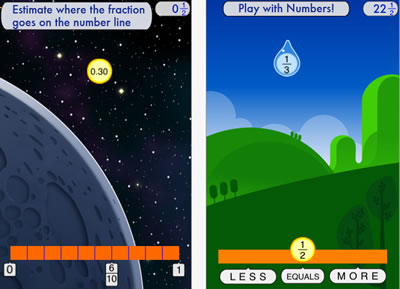
Developed at the Stanford School of Education, Motion Math HD follows a star that has fallen from space, and must bound back up, up, up to its home in the stars. Moving fractions to their correct place on the number line is the only way to return. A recent controlled experiment showed that by playing Motion Math HD, learners improve their ability to estimate fractions and their attitudes toward math.
"History:Maps of World" is a fun and educational collection of high-resolution historical maps.
Check it out to keep up with your history, learn something about history.
Explore art on your iPad.
Art repository Art.com presents a new iPad app, ArtCircles, which lets you explore curated collections of the world's greatest artworks. Curators include designer, Yves Behar; technology innovator, Michael Hawley; president of Rhode Island School of Design, John Maeda, among others.
Monday, May 14, 2012
Highly recommended Apps by 2nd Graders
This is a link to a great post by Mr. Schu. He surveyed his 2nd grade class and shares their top pics:
http://www.alsc.ala.org/blog/2012/05/mr-schus-2nd-graders-highly-recommend-these-apps/
Friday, January 20, 2012
Apps & Apple for Education
New Education Apps from the Apple Event - some great apps for all-
Don't forget to update your iTunes and get the iBooks 2 app update!
Scroll down for apps
The iPad's iBooks app is what the rest of the Apple for Education apps rest on. Available for free today in the iTunes store, iBooks 2 provides deeper functionality and a special section for Apple's major announcement...
iBooks Textbooks for iPad Books would be available for students to keep indefinitely, and could be redownloaded at no charge.
New iTunes U - Learn from your couch!
Check out the new version new version of iTunes U, which offers full college-level courses straight to the iPad or mobile device. All of the course materials, lectures and homework is found within iTunes U.
iBooks Author:
Create and publish amazing Multi-Touch books for iPad.
Now anyone can create stunning iBooks textbooks, cookbooks, history books, picture books, and more for iPad.
(you need OS X)
Sunday, January 1, 2012
The Always Current iOS 5 Tips and Tricks Guide
http://www.maclife.com/files/u307916/2011/12/ios5.jpg
"iOS 5 is an incredibly complex operating system, filled with hundreds of innovative, undocumented little touches, just waiting for you to stumble on. Here's an updated, ever-constant filling of tips and tricks to help you master Apple's latest iOS to the fullest. Keep checking back and be sure to bookmark us for future reference."
Subscribe to:
Posts (Atom)