Neil Gaiman’s 8 Rules of Writing
by Maria Popova
“Perfection is like chasing the horizon. Keep moving.”
In the winter of 2010, inspired by Elmore Leonard’s 10 rules of writing published in The New York Times nearly a decade earlier, The Guardian reached out to some of today’s most celebrated authors and asked them to each offer his or her commandments. After Zadie Smith’s 10 rules of writing, here come 8 from the one and only Neil Gaiman (Graveyard Book, Coraline...)
Also check out: For more timeless wisdom on writing, see Kurt Vonnegut’s 8 rules for a great story, David Ogilvy’s 10 no-bullshit tips, Henry Miller’s 11 commandments,Jack Kerouac’s 30 beliefs and techniques, John Steinbeck’s 6 pointers, andSusan Sontag’s synthesized learnings.
Sunday, October 7, 2012
Monday, October 1, 2012
Friday, July 20, 2012
Pinterestingly....
I know, what a terrible pun. I've been using Pinterest a bit recently--not actually adding information to any boards of my own, but looking at what others have been doing. Pinterest is being touted as one of the hottest takeoffs on the Internet. It's straightforward and easy to use. Sign up, create a board with the title of one of your interests, and "pin" websites and pictures to the board. The resulting display is very visual and accessible. Click on an image and you're taken to the site. There's a place for labels and who pinned it previously (did I say you could repin?). Teachers have been using it to create quick-click resource websites for students. You can't share boards and students can't use it under the Pinterest terms of service, but it is a really useful tool. Today, after reading an article by Kate Messner in School Library Journal about Pinterest and its uses by authors I checked out her Pinterest board for the book Marty McGuire Digs Worms--a book we have in our library. Kate lists a review, information about the book, a Twitter book club link, and lots of information about worms, composting, Earth Day, and activities.
You can search for Pinterest boards when you are searching for information about a topic or to find classroom resources on a topic. Searching for the search terms Pinterest and 2nd grade listed about a dozen teacher sites with 2nd grade as a theme. Search for early literacy, math games, French revolution, whatever.
When you find resources you want to share--maybe with students or parents--create your own boards with your curated resources. You don't need any tech expertise to use Pinterest, just some things you'd like to find and share.
You can search for Pinterest boards when you are searching for information about a topic or to find classroom resources on a topic. Searching for the search terms Pinterest and 2nd grade listed about a dozen teacher sites with 2nd grade as a theme. Search for early literacy, math games, French revolution, whatever.
When you find resources you want to share--maybe with students or parents--create your own boards with your curated resources. You don't need any tech expertise to use Pinterest, just some things you'd like to find and share.
Get Your PLN Info HERE
We had some questions last year about PLNs. PLN is a term that's been floating around the edtech/library world (and probably others we are unaware of) for a couple of years. PLN stands for Personal Learning Network. Most of us--you, too--already have one of some sort. It may be one of the teachers you work with, maybe your mentor, or an administrator. You may also have certain journals you read or columns you check. Those people, either physically present or not, constitute your personal learning network. They're your go-to folks. Chances are, your PLN could be more robust and informative to you if you did a little tweaking. Social media and web 2.0 tools make this easy. A school librarian, Jennifer LaGarde, has created an online tool absolutely chock full of how-to's for growing your PLN. Don't sigh and say, "I'll do this later." Start by taking a peek and some baby steps--you'll be amply rewarded.
Monday, July 9, 2012
Choosing Apps-a Guide
Thursday, July 5, 2012
Flat Stanley App
Several teachers and students at SCS have participated in the Flat Stanley project in the past. Now there's an app for that. Activity generally it consists of sending a flat,
paper Stanley through snail mail with the goal of getting his picture
and story with others around the world. Flat Stanley helps students learn about travel, while
discovering different cultures to develop a love for reading. With this
new app, students can learn about the world through the eyes of Stanley
in a way never before possible. Students can create their
own Flat Stanley (or Flat Stella), they can change Stanely’s features
and clothes and even give him a name and bio before sending him out into
the world. Students can share photos through email, Twitter
and Flatter World within the app. In Flatter World, new Flat Stanleys
have been spotted. If students take enough pictures, they can unlock the
new Flat Stanleys to take photos with.
The Flat Stanley app is COPPA compliant, which means that it is happily usable for kids under the age of 13. An approval crew monitors and approves images shared through the app for an extra layer of safety for students.
Tuesday, June 26, 2012
Follow Digital Kindergarten
Digital Kindergarten
This is a great blog to follow, particularly if you teach the lower grades. Here is the introduction:
Using technology in meaningful, developmentally appropriate ways to make learning come alive and differentiate instruction so that all students achieve. I hope this blog is helpful to anyone utilizing technology with children. If you have found it useful, I appreciate you letting me know and sharing with others.
The author has recently been posting about using iPads in the kindergarten classroom. She has some good suggestions.
Friday, May 25, 2012
:The Multiage Magic
This is pretty thought provoking - good stuff no matter what the current cicumstances.
If you can spare a few minutes.. Listen to the poem.. Digest the post. Click the link below.
"And since the whole thing's imagined anyhow, Imagine being Kevin. Which is he?" Part of the magic of imagination in the education of ourselves as young people lies in our seeing - and in our constantly changing understanding - of the older people around us. We see, we assume, we imagine, we project, we play at, we practice... and then we cycle through all of that again and again."
FOLLOW THIS LINK:
SpeEdChange: The Multiage Magic
Monday, May 21, 2012
TED-Ed Lessons Worth Sharing
Use engaging videos to create customized lessons. You can use, tweak, or completely redo any lesson featured on TED-Ed, or create lessons from scratch based on any video from YouTube.
Google Knowledge Graph: Things Not Strings
"The Knowledge Graph enables you to search for things, people or places that Google knows about—landmarks, celebrities, cities, sports teams, buildings, geographical features, movies, celestial objects, works of art and more—and instantly get information that’s relevant to your query. This is a critical first step towards building the next generation of search, which taps into the collective intelligence of the web and understands the world a bit more like people do."
Find the right thing
The words you search with can often have more than one meaning. With the Knowledge Graph we can understand the difference, and help you narrow your results to find just the answers you're looking for.
Get the best summary
See key facts about your search with the most useful and interesting information for that particular topic, based on the questions other people have asked.
Go deeper and broader
Make unexpected discoveries and explore a topic more deeply with a springboard of information at your fingertips. What you find may surprise you!"
Labels:
Google,
searches,
searching,
searching web_searching
Thursday, May 17, 2012
Favorite Apps
Just a few of our favorite apps for the iPad
Pages lets you create beautiful letters, reports, flyers, and more on your iPad, iPhone, and iPod touch. No matter which device you’re on, iCloud keeps your Pages documents up to date across them all — automatically. And the Retina display makes everything you do in Pages look even more brilliant.
Flipboard creates a personalized magazine out of everything being shared with you. Flip through your Facebook newsfeed, tweets from your Twitter timeline, photos from Instagram friends, sounds from SoundCloud and much more.
Dropbox is a free service that lets you bring all your photos, docs, and videos anywhere. After you install Dropbox on your computer, any file you save to your Dropbox will automatically save to all your computers, your iPhone and iPad and even the Dropbox website! With the Dropbox app, you can take everything that matters to you on the go.
Evernote is an easy-to-use, free app that helps you remember everything across all of the devices you use. Stay organized, save your ideas and improve productivity. Evernote lets you take notes, capture photos, create to-do lists, record voice reminders--and makes these notes completely searchable, whether you are at home, at work, or on the go.
** The original, easiest-to-use, best-selling handwriting app for iPad. On sale. **
Penultimate gives you the fast, tactile gratification of writing on paper, with digital power and flexibility. Take notes, keep sketches, or share your next breakthrough idea -- in the office, on the go, or home on the sofa.
Star Walk is an award-winning Education app that allows users to easily locate and identify 20,000+ objects in the night sky. The 360-degree, touch control star map displays constellations, stars, planets, satellites, and galaxies currently overhead from anywhere on Earth.
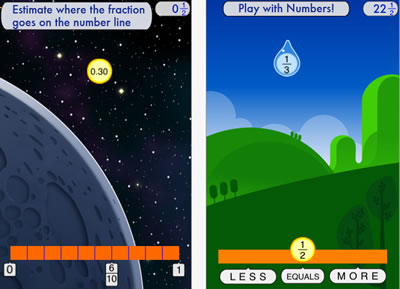
Developed at the Stanford School of Education, Motion Math HD follows a star that has fallen from space, and must bound back up, up, up to its home in the stars. Moving fractions to their correct place on the number line is the only way to return. A recent controlled experiment showed that by playing Motion Math HD, learners improve their ability to estimate fractions and their attitudes toward math.
"History:Maps of World" is a fun and educational collection of high-resolution historical maps.
Check it out to keep up with your history, learn something about history.
Explore art on your iPad.
Art repository Art.com presents a new iPad app, ArtCircles, which lets you explore curated collections of the world's greatest artworks. Curators include designer, Yves Behar; technology innovator, Michael Hawley; president of Rhode Island School of Design, John Maeda, among others.
Wednesday, May 16, 2012
Official Google Enterprise Blog: Find facts and do research inside Google Documents...
Official Google Enterprise Blog: Find facts and do research inside Google Documents...: Posted by Sarveshwar Duddu, Software Engineer Cross-posted on the Google Docs blog . Today we’re introducing the research pane —a new fea...
Monday, May 14, 2012
The Map of Life
The current release allows you to explore globally the geographic distributions for any terrestrial vertebrate species (as well as North American freshwater fish). Specifically you are able to:
- Display expert range maps, point occurrence records, records from study areas such as reserves and larger regions. These are shown as layers on maps, and a layer control widget allows you to adjust ordering, visibility, etc .
- Retrieve a list of species for the vicinity of any location worldwide using the species list tool. Simply set search radius and group of interest, and right click (control-click on Macs) your mouse button on a point of the map.
Map of Life will allow users to see several levels of detail for a given species–from the broad type of environment it lives in, to the finest–specific locations where the species’ presence has been documented. Users may now click on a point on the map and generate a list of vertebrate species in the surrounding area. The project gleans data from a variety of sources, including field guides, museum collections and wildlife checklists that involved scientists, conservation organizations and “citizen scientists. The current demo release allows users explore globally distributions for any vertebrate species and for North American freshwater fish. Much more to come!
A press release from a research team from the University of Colorado and Yale University quoted CU-Boulder Associate Professor Robert Guralnick of the Ecology and Evolutionary Biology Department, and research team member:.
We are taking 200 years of different types of knowledge coming from different sources, all documenting the locations of species around the world and compiling them in a way that will greatly enhance our knowledge of biodiversity. Such information could be used by any organization that needs to make informed decisions regarding land management, health, conservation and climate change.
Walter Jetz, Associate Professor of Ecology and Evolutionary Biology at Yale, and the project lead, shared:
It is the where and the when of a species. It puts at your fingertips the geographic diversity of life. Ultimately, the hope is for this literally to include hundreds of thousands of animal and plant species and show how much or indeed how little we know of their whereabouts.
The project will rely on citizen participation, and an upcoming mapping tool will offer the opportunity for amateurs to supply new or missing information regarding the distribution and abundance of a species. According to Guralnick,
A small but powerful next step is to provide a means for anyone, anywhere on the globe to use their mobile devices to instantly pull up animal and plant distributions and even get a realistic assessment on the odds of encountering a particular species of wildlife.
Thanks to Joyce Valenza for sharing this great resource.
Labels:
animals,
biodiversity,
climate change,
conservation,
geography,
map,
science,
species,
wildlife
Highly recommended Apps by 2nd Graders
This is a link to a great post by Mr. Schu. He surveyed his 2nd grade class and shares their top pics:
http://www.alsc.ala.org/blog/2012/05/mr-schus-2nd-graders-highly-recommend-these-apps/
Tuesday, May 8, 2012
Wednesday, April 4, 2012
Teaching Content Is Teaching Reading
Interesting message
Friday, March 30, 2012
Your Brain on Fiction
" Brain scans are revealing what happens in our heads when we read a detailed description, an evocative metaphor or an emotional exchange between characters. Stories, this research is showing, stimulate the brain and even change how we act in life." http://nyti.ms/xUl3a8
Teaching About Sensitive Issues in the News
Good stuff from the NYTimes Learning Network
10 Ways to Talk to Students About Sensitive Issues in the News
"This week it might be the Trayvon Martin shooting, while last week it could have been the “Kony 2012″ viral video, the soldier in Afghanistan accused ofmassacring women and children, or the outcry over Rush Limbaugh’s criticism of Sandra Fluke: In a “flat” social media world, parents and teachers are no longer the gatekeepers, and news of all kinds reaches children — sometimeseven before it gets to adults.
How do you talk about difficult or sensitive news stories with young people, whether in your classroom or at your dinner table?"
http://teachablemoment.org/
Wednesday, January 25, 2012
Color Uncovered App
Color Uncovered by Exploratorium
Explore the surprising side of color with Color Uncovered, an interactive book that features fascinating illusions, articles, and videos developed by the Exploratorium.
Monday, January 23, 2012
Friday, January 20, 2012
Apps & Apple for Education
New Education Apps from the Apple Event - some great apps for all-
Don't forget to update your iTunes and get the iBooks 2 app update!
Scroll down for apps
The iPad's iBooks app is what the rest of the Apple for Education apps rest on. Available for free today in the iTunes store, iBooks 2 provides deeper functionality and a special section for Apple's major announcement...
iBooks Textbooks for iPad Books would be available for students to keep indefinitely, and could be redownloaded at no charge.
New iTunes U - Learn from your couch!
Check out the new version new version of iTunes U, which offers full college-level courses straight to the iPad or mobile device. All of the course materials, lectures and homework is found within iTunes U.
iBooks Author:
Create and publish amazing Multi-Touch books for iPad.
Now anyone can create stunning iBooks textbooks, cookbooks, history books, picture books, and more for iPad.
(you need OS X)
Friday, January 13, 2012
"The End of Multiple Choice? The Quest To Create Accurate Robot Essay Graders
When kids have "10,000 keystroke days," data miners will be able to extract countless observations about students. http://www.fastcoexist.com/node/1679134
Mmmm...
Labels:
assessment,
CCSS,
ELA,
smarterbalance,
testing,
writing
Sunday, January 1, 2012
The Always Current iOS 5 Tips and Tricks Guide
http://www.maclife.com/files/u307916/2011/12/ios5.jpg
"iOS 5 is an incredibly complex operating system, filled with hundreds of innovative, undocumented little touches, just waiting for you to stumble on. Here's an updated, ever-constant filling of tips and tricks to help you master Apple's latest iOS to the fullest. Keep checking back and be sure to bookmark us for future reference."
Tuesday, November 29, 2011
GeoGebra!
What is GeoGebra?
GeoGebra is dynamic geometry software. Constructions can be made with points, vectors, segments, lines, polygons, conic sections, inequalities, implicit polynomials and functions. All of them can be changed dynamically afterwards.
GeoGebraFree mathematics software for learning and teaching | |
|
Monday, November 21, 2011
Amazing Image Search Tools
WOW!
"Although Google has been playing with some fun image search toys in its lab and the official Google Image Search has recently significantly upped its game, some of its most hyped features — color search, instant scrolling, hover preview — are but mere shadows of sleeker, better versions that geekier, more sophisticated image search tools offer. Here are seven of our favorites.....READ MORE
http://www.brainpickings.org/index.php/2010/10/01/best-image-search-tools/
"Although Google has been playing with some fun image search toys in its lab and the official Google Image Search has recently significantly upped its game, some of its most hyped features — color search, instant scrolling, hover preview — are but mere shadows of sleeker, better versions that geekier, more sophisticated image search tools offer. Here are seven of our favorites.....READ MORE
http://www.brainpickings.org/index.php/2010/10/01/best-image-search-tools/
Thursday, October 20, 2011
IQ changes in teens as brain changes, study finds
A study in the journal Nature looked at IQ tests and MRI scans for 33 teens over four years and found fluctuations in their verbal and nonverbal IQ scores that were linked to changes in their brain structure. Researchers noted that verbal IQ changes correlated with changes in gray matter density and volume in a part of the left motor cortex, while nonverbal IQ changes were correlated with gray matter density in the anterior cerebellum
IQ changes in teens as brain changes, study finds
Well of course it does!
IQ changes in teens as brain changes, study finds
Well of course it does!
Thursday, June 16, 2011
USE DROPBOX AND LEAVE YOUR "G" DRIVE AT SCHOOL
Try out Dropbox. It's FREE. Sync your files. Available for PC, Mac, Android, iPhone and iPad.
From the Dropbox website:
"All your stuff, when you need it.
Dropbox works hard to make sure that all your files are the same no matter where you're working from. This means that you can start working on a computer at school or the office, and finish from your home computer. Never email yourself a file again! Download Dropbox for your phone to simplify your life even more -- flip through all your photos or review that spreadsheet even while on the road. Dropbox lets you work from any computer or phone with the confidence that you'll always have everything you need."http://dropbox.com tour "be anywhere"
NYTIMES: COMMON CORE STRATEGIES FOR INFORMATIONAL TEXT
Check this out....
The Times and the Common Core Standards: Reading Strategies for ‘Informational Text’
Why the Common Core Standards and The New York Times are perfect together, and a list of all our favorite literacy strategies for before, during and after reading a Times article with students. Bookmark this one!
The Times and the Common Core Standards: Reading Strategies for ‘Informational Text’Why the Common Core Standards and The New York Times are perfect together, and a list of all our favorite literacy strategies for before, during and after reading a Times article with students. Bookmark this one!
Tuesday, January 25, 2011
Welcome to Our New Space
The SCS Tech-Media News has moved. We've been pondering how to make our information more available and we want to try this format. It's a blog, created with our cssu.org domain. If you would like to get notification when a new item is posted, then subscribe--you can subscribe with email, or with an RSS feed. We may also send you a reminder occasionally when we have several new posts.
Microsoft Office Will Stay
If you've been reading our SCS Tech-Media News, or even just heard the word, we--as part of a CSSU program--were going to remove Microsoft Office from our computers and begin to rely on Google Docs and Open Office. Between the time this decision was made and real transition was beginning, Microsoft agressively lowered their prices. The new pricing makes it afforable to stay with Office instead of moving to Open Office and providing training for the move.
Discussions about whether we stay with Office 07 or move to Office 10 are now underway. There are advantages to both systems. We will keep you posted on the news when a decision is made. For now, Office will be with us, although we are encouraging folks to use Google Docs for most tasks--it's more easily accessible and performs most of the tasks we use everyday.
Subscribe to:
Posts (Atom)